Skip to content

plotresults

Description

This module contains all the functions used to visualise the results of computations.

Result plots are usually provided with a plot title because small variations in the analyses parameters might change the interpretation of the plot.


plot_coherence(coherence_results, coherence_band_results=None, show_confidence_level=True, delta_frequency_range=(1, 5, 'tab:blue'), alpha_frequency_range=(5, 15, 'tab:green'), beta_frequency_range=(15, 35, 'tab:orange'), gamma_frequency_range=(35, 60, 'tab:red'), show_frequency_bands=True, show_legend=True, legend_location='inside', max_frequency=80, figsize=[20, 15], tight_layout=True, showimmediately=True, use_plt=True)

Plot the raw coherence curve or a z-scored coherence curve.

PARAMETER DESCRIPTION
coherence_results

Dictionary containing the coherence results from pooled_intramuscular_coherence or z_score_coherence.

TYPE: dict

coherence_band_results

Output DataFrame from calculate_coherence_bands.

TYPE: DataFrame or None DEFAULT: None

show_confidence_level

When True and coherence_band_results is provided, the confidence level value will be shown in the figure.

TYPE: bool DEFAULT: True

show_confidence_level

When True and coherence_band_results is provided, the confidence level value will be shown in the figure.

TYPE: bool DEFAULT: True

delta_frequency_range

Frequency range and colour used to highlight the delta band. The tuple must contain the lower frequency, upper frequency, and matplotlib-compatible colour.

TYPE: tuple DEFAULT: (1, 5, "tab:blue")

alpha_frequency_range

Frequency range and colour used to highlight the alpha band. The tuple must contain the lower frequency, upper frequency, and matplotlib-compatible colour.

TYPE: tuple DEFAULT: (5, 15, "tab:green")

beta_frequency_range

Frequency range and colour used to highlight the beta band. The tuple must contain the lower frequency, upper frequency, and matplotlib-compatible colour.

TYPE: tuple DEFAULT: (15, 35, "tab:orange")

gamma_frequency_range

Frequency range and colour used to highlight the gamma band. The tuple must contain the lower frequency, upper frequency, and matplotlib-compatible colour.

TYPE: tuple DEFAULT: (35, 60, "tab:red")

show_frequency_bands

If True, shaded frequency bands are plotted in the background of the coherence figure.

TYPE: bool DEFAULT: True

show_legend

If True and show_frequency_bands is True, the legend describing the frequency bands is shown.

TYPE: bool DEFAULT: True

legend_location

Location of the legend.

inside The legend is placed inside the figure.

outside The legend is placed outside the figure.

TYPE: str {"inside", "outside"} DEFAULT: "inside"

max_frequency

Maximum frequency shown on the x-axis.

TYPE: int or float DEFAULT: 80

figsize

Size of the figure in centimeters [width, height].

TYPE: list DEFAULT: [20, 15]

tight_layout

If True (default), fig.tight_layout() is called and the figure's layout is improved. It is useful to set it to False when calling the function from a GUI.

TYPE: bool DEFAULT: True

showimmediately

If True (default), plt.show() is called to display the figure to the user. This has an effect only if use_plt is True. Set to False when using the function within a GUI or when managing figure display manually.

TYPE: bool DEFAULT: True

use_plt

Whether to use the pyplot interface (plt.subplots) or the object-oriented matplotlib.figure.Figure API to create the figure. Set to False in GUI applications or headless environments to avoid the persistent pyplot's global state.

TYPE: bool DEFAULT: True

RETURNS DESCRIPTION
fig

TYPE: pyplot `~.figure.Figure`

Examples:

Plot pooled intramuscular coherence from a resized steady-state signal.

>>> import openhdemg.library as emg
>>> emgfile = emg.askloadmodule()
>>> steady_emgfile, _, _ = emg.resize_emgfile(
...     emgfile,
...     area=[15400, 50770],
... )
>>> coherence_results = emg.pooled_intramuscular_coherence(
...     emgfile=steady_emgfile,
... )
>>> fig = emg.plot_coherence(
...     coherence_results=coherence_results,
... )

Plot z-scored pooled intramuscular coherence and show the confidence level, but not the frequency bands.

>>> import openhdemg.library as emg
>>> emgfile = emg.askloadmodule()
>>> steady_emgfile, _, _ = emg.resize_emgfile(
...     emgfile,
...     area=[15400, 50770],
... )
>>> coherence_results = emg.pooled_intramuscular_coherence(
...     emgfile=steady_emgfile,
... )
>>> z_coherence_results = emg.z_score_coherence(
...     coherence_results,
... )
>>> coherence_band_results = emg.calculate_coherence_bands(
...     z_coherence_results,
... )
>>> emg.plot_coherence(
...     coherence_results=z_coherence_results,
...     coherence_band_results=coherence_band_results,
...     show_confidence_level=True,
...     show_frequency_bands=False,
... )


plot_smoothed_dr_pca_selection(pca_results, components_to_plot=-1, component_numbering_base=0, show_legend=True, legend_location='inside', figsize=[20, 15], tight_layout=True, showimmediately=True, use_plt=True)

Plot the PCA component-selection criterion.

PARAMETER DESCRIPTION
pca_results

Dictionary containing the PCA results from smoothed_dr_pca.

TYPE: dict

components_to_plot

Number of components to plot. If -1, all components are plotted.

TYPE: int DEFAULT: -1

component_numbering_base

Base used to number components on the x-axis. If 0, components are numbered from 0. If 1, components are numbered from 1.

TYPE: int DEFAULT: 0

show_legend

If True, the legend describing the plotted component-selection quantities is shown.

TYPE: bool DEFAULT: True

legend_location

Location of the legend.

inside The legend is placed inside the figure.

outside The legend is placed outside the figure.

TYPE: str {"inside", "outside"} DEFAULT: "inside"

figsize

Size of the figure in centimeters [width, height].

TYPE: list DEFAULT: [20, 15]

tight_layout

If True (default), fig.tight_layout() is called and the figure's layout is improved. It is useful to set it to False when calling the function from a GUI.

TYPE: bool DEFAULT: True

showimmediately

If True (default), plt.show() is called to display the figure to the user. This has an effect only if use_plt is True. Set to False when using the function within a GUI or when managing figure display manually.

TYPE: bool DEFAULT: True

use_plt

Whether to use the pyplot interface (plt.subplots) or the object-oriented matplotlib.figure.Figure API to create the figure. Set to False in GUI applications or headless environments to avoid the persistent pyplot's global state.

TYPE: bool DEFAULT: True

RETURNS DESCRIPTION
fig

The generated PCA component-selection figure.

TYPE: pyplot `~.figure.Figure`

Examples:

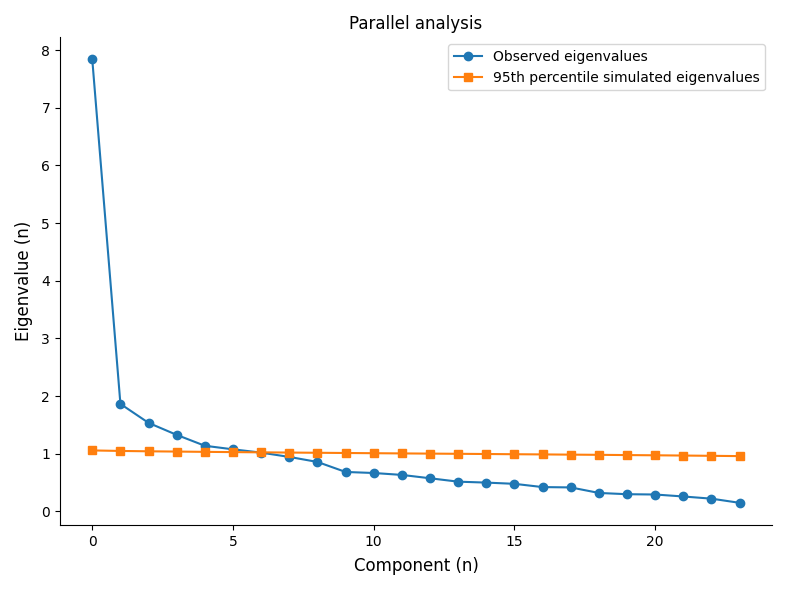
Plot the number of PCA components retained using parallel analysis.

>>> import openhdemg.library as emg
>>> emgfile = emg.askloadmodule()
>>> steady_emgfile, _, _ = emg.resize_emgfile(
...     emgfile,
...     area=[15400, 50770],
... )
>>> pca_results = emg.smoothed_dr_pca(
...     emgfile=steady_emgfile,
...     method_n_components="parallel_analysis",
... )
>>> emg.plot_smoothed_dr_pca_selection(pca_results=pca_results)
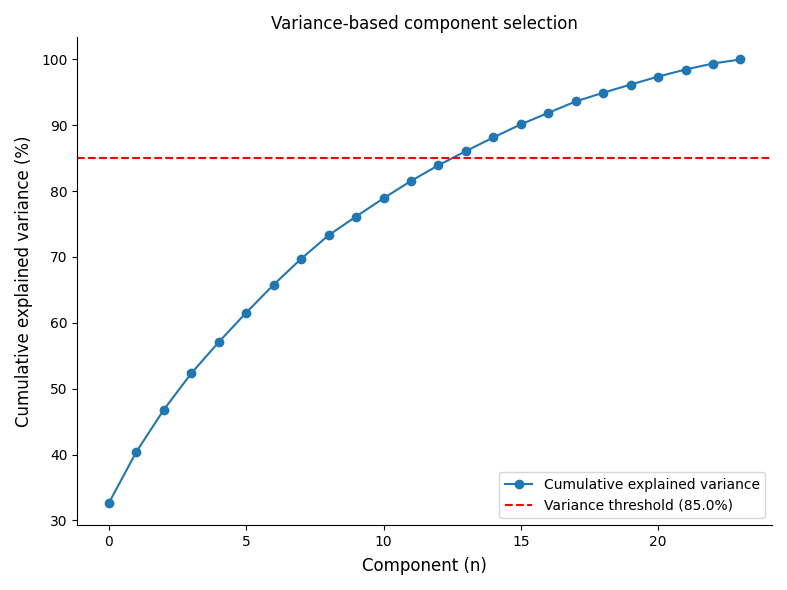
Plot the number of PCA components retained using a cumulative explained variance threshold.

>>> import openhdemg.library as emg
>>> emgfile = emg.askloadmodule()
>>> steady_emgfile, _, _ = emg.resize_emgfile(
...     emgfile,
...     area=[15400, 50770],
... )
>>> pca_results = emg.smoothed_dr_pca(
...     emgfile=steady_emgfile,
...     method_n_components="variance_greater_than_threshold",
...     variance_threshold=85.0,
... )
>>> emg.plot_smoothed_dr_pca_selection(pca_results=pca_results)
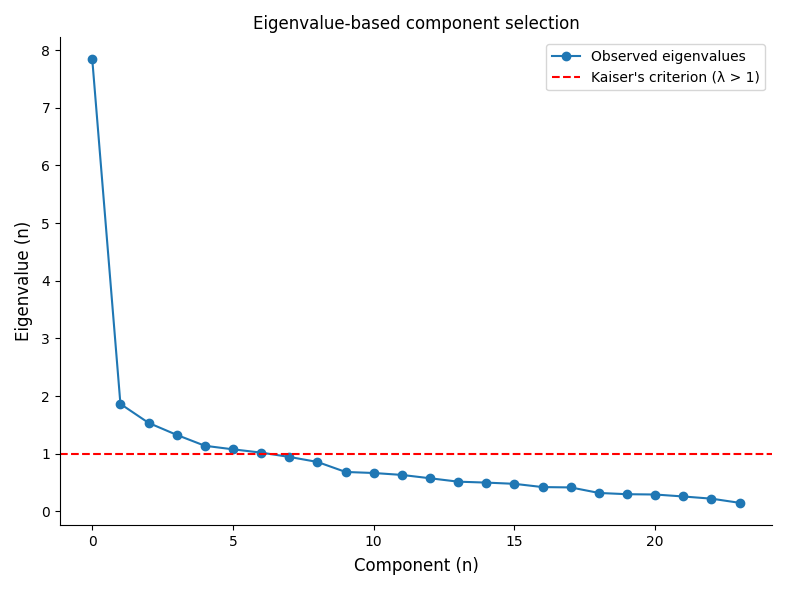
Plot the number of PCA components retained using Kaiser's criterion.

>>> import openhdemg.library as emg
>>> emgfile = emg.askloadmodule()
>>> steady_emgfile, _, _ = emg.resize_emgfile(
...     emgfile,
...     area=[15400, 50770],
... )
>>> pca_results = emg.smoothed_dr_pca(
...     emgfile=steady_emgfile,
...     method_n_components="eigenvalue_greater_than_one",
... )
>>> emg.plot_smoothed_dr_pca_selection(pca_results=pca_results)

plot_smoothed_dr_pca_low_dimensional_comp(emgfile, pca_results, components_to_plot=-1, component_numbering_base=0, show_legend=True, legend_location='outside', figsize=[20, 15], tight_layout=True, showimmediately=True, use_plt=True)

Plot the retained low-dimensional PCA components.

PARAMETER DESCRIPTION
emgfile

The dictionary containing the emgfile.

TYPE: dict

pca_results

Dictionary containing the PCA results from smoothed_dr_pca.

TYPE: dict

components_to_plot

Number of low-dimensional components to plot. If -1, all retained components are plotted.

TYPE: int DEFAULT: -1

component_numbering_base

Base used to number components in the legend. If 0, components are numbered from 0. If 1, components are numbered from 1.

TYPE: int DEFAULT: 0

show_legend

If True, the legend describing the retained low-dimensional components is shown.

TYPE: bool DEFAULT: True

legend_location

Location of the legend.

inside The legend is placed inside the figure.

outside The legend is placed outside the figure.

TYPE: str {"inside", "outside"} DEFAULT: "outside"

figsize

Size of the figure in centimeters [width, height].

TYPE: list DEFAULT: [20, 15]

tight_layout

If True (default), fig.tight_layout() is called and the figure's layout is improved. It is useful to set it to False when calling the function from a GUI.

TYPE: bool DEFAULT: True

showimmediately

If True (default), plt.show() is called to display the figure to the user. This has an effect only if use_plt is True. Set to False when using the function within a GUI or when managing figure display manually.

TYPE: bool DEFAULT: True

use_plt

Whether to use the pyplot interface (plt.subplots) or the object-oriented matplotlib.figure.Figure API to create the figure. Set to False in GUI applications or headless environments to avoid the persistent pyplot's global state.

TYPE: bool DEFAULT: True

RETURNS DESCRIPTION
fig

The generated low-dimensional PCA components figure.

TYPE: pyplot `~.figure.Figure`

Examples:

Plot the retained low-dimensional PCA components.

>>> import openhdemg.library as emg
>>> emgfile = emg.askloadmodule()
>>> steady_emgfile, _, _ = emg.resize_emgfile(
...     emgfile,
...     area=[15400, 50770],
... )
>>> pca_results = emg.smoothed_dr_pca(emgfile=steady_emgfile)
>>> emg.plot_smoothed_dr_pca_low_dimensional_comp(
...     emgfile=steady_emgfile,
...     pca_results=pca_results,
...     show_legend=False,
... )


plot_common_drive_index(cdi_results, show_individual_pairs=True, show_confidence_level=True, show_legend=True, legend_location='inside', show_values_in_title=True, figsize=[20, 15], tight_layout=True, showimmediately=True, use_plt=True)

Plot the common drive index cross-correlation signals.

PARAMETER DESCRIPTION
cdi_results

Dictionary containing the common drive index results from common_drive_index.

TYPE: dict

show_individual_pairs

If True, the cross-correlation signals from all individual MU pairs are shown in the background.

TYPE: bool DEFAULT: True

show_confidence_level

If True, the confidence level used to determine significant pairwise correlations is shown.

TYPE: bool DEFAULT: True

show_legend

If True, the legend describing the plotted cross-correlation signals is shown.

TYPE: bool DEFAULT: True

legend_location

Location of the legend.

inside The legend is placed inside the figure.

outside The legend is placed outside the figure.

TYPE: str {"inside", "outside"} DEFAULT: "inside"

show_values_in_title

If True, common drive index values and the percentage of significant pairs are shown in the title.

TYPE: bool DEFAULT: True

figsize

Size of the figure in centimeters [width, height].

TYPE: list DEFAULT: [20, 15]

tight_layout

If True (default), fig.tight_layout() is called and the figure's layout is improved. It is useful to set it to False when calling the function from a GUI.

TYPE: bool DEFAULT: True

showimmediately

If True (default), plt.show() is called to display the figure to the user. This has an effect only if use_plt is True. Set to False when using the function within a GUI or when managing figure display manually.

TYPE: bool DEFAULT: True

use_plt

Whether to use the pyplot interface (plt.subplots) or the object-oriented matplotlib.figure.Figure API to create the figure. Set to False in GUI applications or headless environments to avoid the persistent pyplot's global state.

TYPE: bool DEFAULT: True

RETURNS DESCRIPTION
fig

The generated common drive index figure.

TYPE: pyplot `~.figure.Figure`

Examples:

Plot the common drive index cross-correlation signals.

>>> import openhdemg.library as emg
>>> emgfile = emg.askloadmodule()
>>> steady_emgfile, _, _ = emg.resize_emgfile(
...     emgfile,
...     area=[15400, 50770],
... )
>>> cdi_results = emg.common_drive_index(emgfile=steady_emgfile)
>>> emg.plot_common_drive_index(cdi_results=cdi_results)


plot_common_drive_matrix(cdi_results, thresholded=True, mu_numbering_base=0, cmap='coolwarm', vmin=0, vmax=1, show_colorbar=True, show_values_in_title=True, figsize=[20, 15], tight_layout=True, showimmediately=True, use_plt=True)

Plot the pairwise common drive matrix.

PARAMETER DESCRIPTION
cdi_results

Dictionary containing the common drive index results from common_drive_index.

TYPE: dict

thresholded

If True, the thresholded pairwise common drive matrix is plotted. If False, the non-thresholded pairwise common drive matrix is plotted.

TYPE: bool DEFAULT: True

mu_numbering_base

Base used to number MUs on the x- and y-axes. If 0, MUs are numbered from 0. If 1, MUs are numbered from 1.

TYPE: int DEFAULT: 0

cmap

Matplotlib colormap used to plot the pairwise common drive matrix.

TYPE: str DEFAULT: "coolwarm"

vmin

Minimum value used to scale the colormap.

TYPE: int or float DEFAULT: 0

vmax

Maximum value used to scale the colormap.

TYPE: int or float DEFAULT: 1

show_colorbar

If True, the colorbar describing the matrix values is shown.

TYPE: bool DEFAULT: True

show_values_in_title

If True, common drive index values and the percentage of significant pairs are shown in the title.

TYPE: bool DEFAULT: True

figsize

Size of the figure in centimeters [width, height].

TYPE: list DEFAULT: [20, 15]

tight_layout

If True (default), fig.tight_layout() is called and the figure's layout is improved. It is useful to set it to False when calling the function from a GUI.

TYPE: bool DEFAULT: True

showimmediately

If True (default), plt.show() is called to display the figure to the user. This has an effect only if use_plt is True. Set to False when using the function within a GUI or when managing figure display manually.

TYPE: bool DEFAULT: True

use_plt

Whether to use the pyplot interface (plt.subplots) or the object-oriented matplotlib.figure.Figure API to create the figure. Set to False in GUI applications or headless environments to avoid the persistent pyplot's global state.

TYPE: bool DEFAULT: True

RETURNS DESCRIPTION
fig

The generated pairwise common drive matrix figure.

TYPE: pyplot `~.figure.Figure`

Examples:

Plot the thresholded pairwise common drive matrix.

>>> import openhdemg.library as emg
>>> emgfile = emg.askloadmodule()
>>> steady_emgfile, _, _ = emg.resize_emgfile(
...     emgfile,
...     area=[15400, 50770],
... )
>>> cdi_results = emg.common_drive_index(emgfile=steady_emgfile)
>>> emg.plot_common_drive_matrix(cdi_results=cdi_results)


plot_pci_index(pci_results, show_legend=True, legend_location='inside', figsize=[20, 15], tight_layout=True, showimmediately=True, use_plt=True)

Plot observed and fitted PCI coherence values.

PARAMETER DESCRIPTION
pci_results

Dictionary containing the proportion of common input index results from pci_index.

TYPE: dict

show_legend

If True, the legend describing the observed and fitted coherence values for each frequency band is shown.

TYPE: bool DEFAULT: True

legend_location

Location of the legend.

inside The legend is placed inside the figure.

outside The legend is placed outside the figure.

TYPE: str {"inside", "outside"} DEFAULT: "inside"

figsize

Size of the figure in centimeters [width, height].

TYPE: list DEFAULT: [20, 15]

tight_layout

If True (default), fig.tight_layout() is called and the figure's layout is improved. It is useful to set it to False when calling the function from a GUI.

TYPE: bool DEFAULT: True

showimmediately

If True (default), plt.show() is called to display the figure to the user. This has an effect only if use_plt is True. Set to False when using the function within a GUI or when managing figure display manually.

TYPE: bool DEFAULT: True

use_plt

Whether to use the pyplot interface (plt.subplots) or the object-oriented matplotlib.figure.Figure API to create the figure. Set to False in GUI applications or headless environments to avoid the persistent pyplot's global state.

TYPE: bool DEFAULT: True

RETURNS DESCRIPTION
fig

The generated PCI figure.

TYPE: pyplot `~.figure.Figure`

Examples:

Plot observed and fitted coherence values used to estimate the PCI index.

>>> import openhdemg.library as emg
>>> emgfile = emg.askloadmodule()
>>> steady_emgfile, _, _ = emg.resize_emgfile(
...     emgfile,
...     area=[15400, 50770],
... )
>>> pci_results = emg.pci_index(emgfile=steady_emgfile)
>>> emg.plot_pci_index(pci_results=pci_results)


plot_smoothed_dr_mutualinformation_matrix(network_results, thresholded=True, mu_numbering_base=0, cmap='coolwarm', vmin=0, vmax=1, show_colorbar=True, show_values_in_title=True, figsize=[20, 15], tight_layout=True, showimmediately=True, use_plt=True)

Plot the pairwise mutual-information matrix.

PARAMETER DESCRIPTION
network_results

Dictionary containing the network information framework results from smoothed_dr_mutualinformation.

TYPE: dict

thresholded

If True, the thresholded pairwise mutual-information matrix is plotted. If False, the non-thresholded pairwise mutual-information matrix is plotted.

TYPE: bool DEFAULT: True

mu_numbering_base

Base used to number MUs on the x- and y-axes. If 0, MUs are numbered from 0. If 1, MUs are numbered from 1.

TYPE: int DEFAULT: 0

cmap

Matplotlib colormap used to plot the pairwise mutual-information matrix.

TYPE: str DEFAULT: "coolwarm"

vmin

Minimum value used to scale the colormap.

TYPE: int or float DEFAULT: 0

vmax

Maximum value used to scale the colormap.

TYPE: int or float DEFAULT: 1

show_colorbar

If True, the colorbar describing the matrix values is shown.

TYPE: bool DEFAULT: True

show_values_in_title

If True, common drive index values and the percentage of significant pairs are shown in the title.

TYPE: bool DEFAULT: True

figsize

Size of the figure in centimeters [width, height].

TYPE: list DEFAULT: [20, 15]

tight_layout

If True (default), fig.tight_layout() is called and the figure's layout is improved. It is useful to set it to False when calling the function from a GUI.

TYPE: bool DEFAULT: True

showimmediately

If True (default), plt.show() is called to display the figure to the user. This has an effect only if use_plt is True. Set to False when using the function within a GUI or when managing figure display manually.

TYPE: bool DEFAULT: True

use_plt

Whether to use the pyplot interface (plt.subplots) or the object-oriented matplotlib.figure.Figure API to create the figure. Set to False in GUI applications or headless environments to avoid the persistent pyplot's global state.

TYPE: bool DEFAULT: True

RETURNS DESCRIPTION
fig

The generated mutual-information matrix figure.

TYPE: pyplot `~.figure.Figure`

Examples:

Examples

Plot the thresholded pairwise mutual-information matrix.

>>> import openhdemg.library as emg
>>> emgfile = emg.askloadmodule()
>>> steady_emgfile, _, _ = emg.resize_emgfile(
...     emgfile,
...     area=[15400, 50770],
... )
>>> network_results = emg.smoothed_dr_mutualinformation(
...     emgfile=steady_emgfile,
... )
>>> emg.plot_smoothed_dr_mutualinformation_matrix(
...     network_results=network_results
... )

Plot the non-thresholded pairwise mutual-information matrix using automatic colour scaling.

>>> import openhdemg.library as emg
>>> emgfile = emg.askloadmodule()
>>> steady_emgfile, _, _ = emg.resize_emgfile(
...     emgfile,
...     area=[15400, 50770],
... )
>>> network_results = emg.smoothed_dr_mutualinformation(
...     emgfile=steady_emgfile,
... )
>>> emg.plot_smoothed_dr_mutualinformation_matrix(
...     network_results=network_results,
...     thresholded=False,
...     vmax=0.5,
... )


plot_smoothed_dr_mu_network(network_results, mu_numbering_base=0, node_size=800, show_labels=True, show_values_in_title=True, figsize=[20, 15], tight_layout=True, showimmediately=True, use_plt=True)

Plot the MU mutual-information network.

PARAMETER DESCRIPTION
network_results

Dictionary containing the network information framework results from smoothed_dr_mutualinformation.

TYPE: dict

mu_numbering_base

Base used to number MUs on the x- and y-axes. If 0, MUs are numbered from 0. If 1, MUs are numbered from 1.

TYPE: int DEFAULT: 0

node_size

Size of the network nodes.

TYPE: int or float DEFAULT: 800

show_labels

If True, MU labels are shown inside the network nodes.

TYPE: bool DEFAULT: True

show_values_in_title

If True, common drive index values and the percentage of significant pairs are shown in the title.

TYPE: bool DEFAULT: True

figsize

Size of the figure in centimeters [width, height].

TYPE: list DEFAULT: [20, 15]

tight_layout

If True (default), fig.tight_layout() is called and the figure's layout is improved. It is useful to set it to False when calling the function from a GUI.

TYPE: bool DEFAULT: True

showimmediately

If True (default), plt.show() is called to display the figure to the user. This has an effect only if use_plt is True. Set to False when using the function within a GUI or when managing figure display manually.

TYPE: bool DEFAULT: True

use_plt

Whether to use the pyplot interface (plt.subplots) or the object-oriented matplotlib.figure.Figure API to create the figure. Set to False in GUI applications or headless environments to avoid the persistent pyplot's global state.

TYPE: bool DEFAULT: True

RETURNS DESCRIPTION
fig

The generated MU network figure.

TYPE: pyplot `~.figure.Figure`

Examples:

Plot the MU mutual-information network.

>>> import openhdemg.library as emg
>>> emgfile = emg.askloadmodule()
>>> steady_emgfile, _, _ = emg.resize_emgfile(
...     emgfile,
...     area=[15400, 50770],
... )
>>> network_results = emg.smoothed_dr_mutualinformation(
...     emgfile=steady_emgfile,
... )
>>> emg.plot_smoothed_dr_mu_network(network_results=network_results)